Your Online Petty Cash Book — Every Box, Every Transaction, One Place
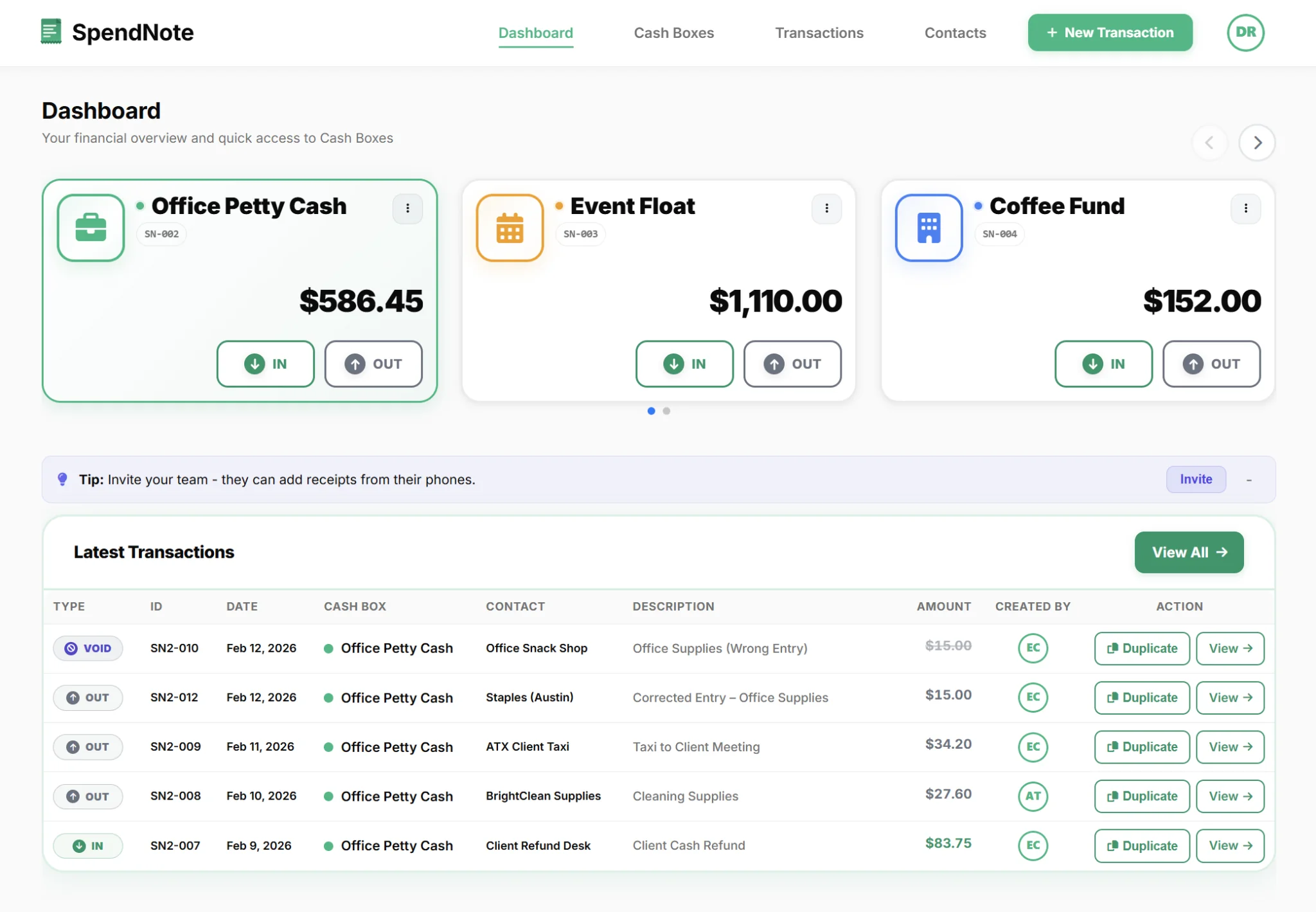
Every petty cash box your team uses lives in one place — log a transaction, see the balance, print a receipt. No paper book, no spreadsheet, no accounting setup.
Why a Multi-Site Team Needs an Online Cash Book, Not a Paper Stack
If you run petty cash at one location, a paper book or a single Excel tab gets the job done. The moment you have two or more cash boxes — one per site, one per project, one per department, one per franchise unit — the model breaks. Each location keeps its own paper book or its own copy of the spreadsheet. By the end of the month you are emailing back and forth, asking who spent what, why the balance does not match, and which Friday $40 went to the office printer at site B.
An online cash book ends that loop. Every site logs cash directly into one shared system. Each cash box keeps its own running balance and its own per-site history, but you see all of them side-by-side on one dashboard. No version conflicts, no end-of-month reconstruction, no waiting for the site manager to send a screenshot of their notebook. Some teams call this an online petty cash book or a digital petty cash book — same idea, same problem it solves.
Heads-Up: Built for Teams Running 2+ Cash Boxes
Be honest about whether you need this. SpendNote is a paid tool from $15.83/month, and it earns its keep when you actually have multiple cash boxes to keep straight — multiple sites, multiple departments, multiple project codes, or multiple franchise units. If you run a single petty cash drawer at one office, a notebook or one Excel tab is enough — do not buy a tool you will not use.
Where SpendNote pays for itself: the multi-site small business, the school office plus its clubs and athletics floats, the construction PM running 2–3 site cash boxes, and the operations manager who is tired of chasing per-department spreadsheets.
Who This Is For
Multi-Site Small Business Owner
Two to four locations — a small franchise group, a multi-shop boutique, a couple of clinics, a few food trucks. Each site has a small cash drawer for change, supplies, or quick reimbursements. Today, each manager keeps a paper book and you piece it all together at month-end. With one online cash book, every site logs into the same system, every cash box keeps its own running balance, and you see every location at a glance.
School Office or Club Treasurer
One main school office plus separate cash floats for the PTA, athletics, the library fund, and a couple of student clubs. Each one needs its own balance, its own history, and (often) its own person responsible — but the office wants visibility across all of them. Per-cash-box role-based access plus one shared dashboard fits this exactly.
Construction or Field-Site Project Manager
Two or three active sites, each with a small cash box for site supplies, parking, and quick paid-cash purchases. Site supervisors log transactions on their phone as they happen; you see the running balance for every site without driving out to collect the paper book at the end of the week.
Multi-Department Operations Manager
One company, several departments — warehouse, reception, marketing, IT — each with its own little cash box. Today you receive four different spreadsheet formats once a month. With per-department cash boxes inside one online cash book, the reconciliation goes from a half-day Excel exercise to a five-minute review of one dashboard.
How One Dashboard Manages Many Cash Boxes
The architecture is simple: one account, many cash boxes. Each cash box behaves independently — its own balance, its own history, its own assigned users — but the data lives in one place so a single admin sees everything.
Per-Site Cash Box, Per-Site Balance
Create one cash box per site, department, project, or franchise unit. Each one keeps its own running balance based on its own IN and OUT transactions, completely independent of the others.
Role-Based Access Per Site
Admins see every cash box across every location. Site users only see the cash boxes they are assigned to — the school librarian sees the library float and nothing else, the warehouse lead sees the warehouse box and nothing else.
Searchable Across All Sites
Filter the transaction history by any combination of cash box, date range, partner, or person who recorded it. Find any logged transaction in seconds, whether it happened at site A in March or site C last Tuesday.
One Export, All Sites
Export filtered transactions to CSV or PDF — one site at a time, or every site in a single file. Built so your bookkeeper can import the data into whatever they actually use to keep the books.
Original Record Stays Visible
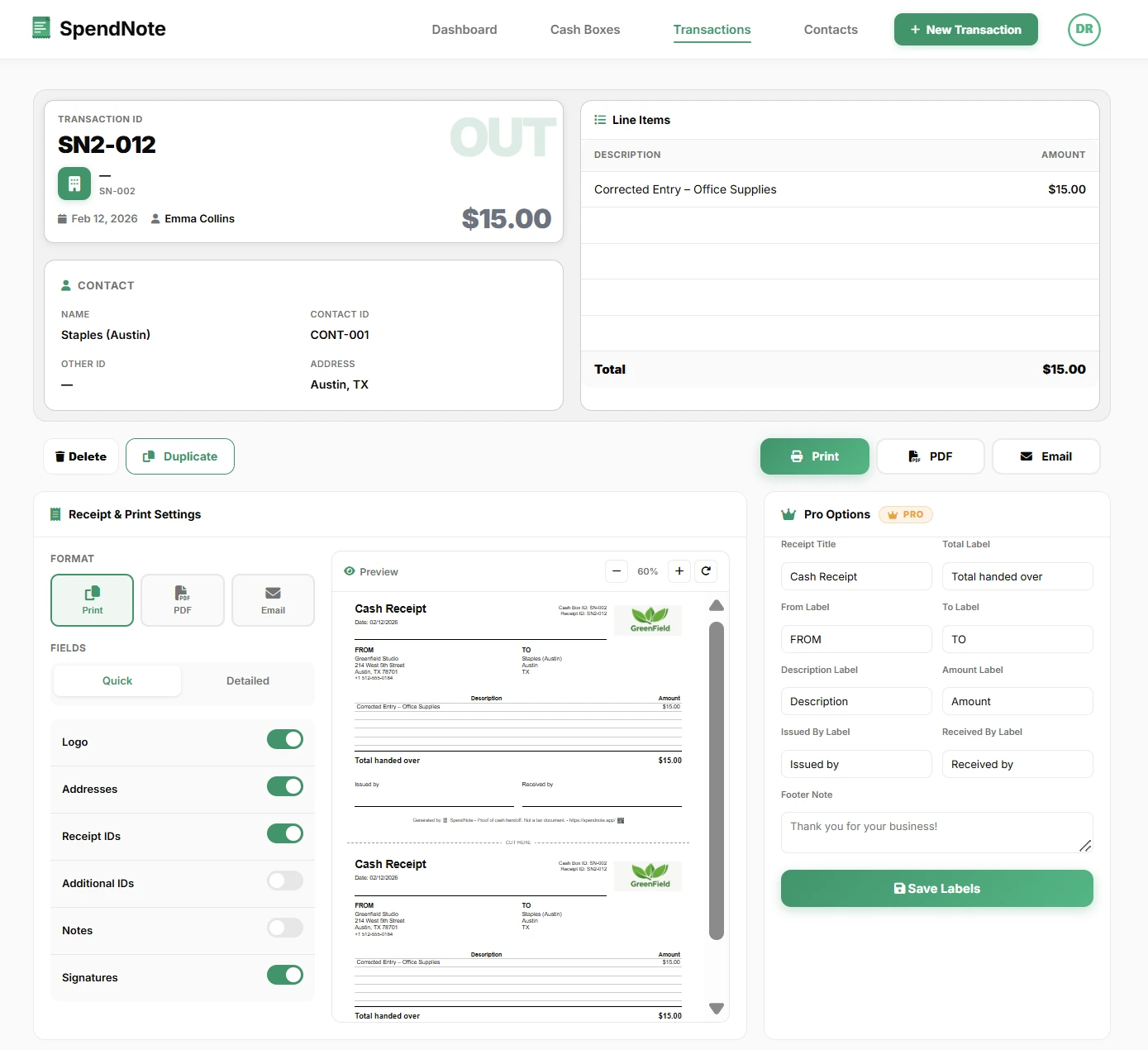
SpendNote uses a void instead of delete model — if a transaction is corrected, the original record stays visible alongside the correction. No deletions, just clear history. This matters most on multi-site setups, where the wrong person at the wrong site otherwise has the chance to quietly erase a row before the month-end review.
Open Your Online Cash Book in Seconds
One account, every cash box, one dashboard — log a transaction, see the balance, print a receipt. Free to start, no credit card.
Open Petty Cash BookImportant: SpendNote is a digital cash handoff tracker, not accounting software. Every logged transaction (with date, parties, and amount) gives you a clean per-site record of what actually happened with the cash — but it is not a journal entry, not a tax document, and not a substitute for your bookkeeper, accountant, or accounting system. The CSV export is built so your bookkeeper can take the per-site cash record and bring it into whatever software they actually post journals into.
This Is Not Accounting Software
Let’s be very clear about what an online cash book like SpendNote does and does not do:
- It does: Keep a per-site, per-cash-box record of every cash IN and OUT, with running balances, role-based access, search, and CSV/PDF export.
- It does not: Post journal entries, calculate VAT or sales tax, generate invoices, run payroll, file tax returns, or replace your bookkeeper.
If you have an accountant, your bookkeeper takes the SpendNote CSV and brings the data into the system that actually keeps your books. If you do not have an accountant, you probably should — an online cash book gives them clean per-site cash records to work with, but it is not the books themselves.
If you’re evaluating this category more broadly rather than the multi-site flow specifically, see our petty cash software for teams overview — same underlying tool, framed from the buyer-perspective.
Related Pages for Different Cash-Book Needs
This page is about every cash box in one online book. If you have a related need, here's where to go next:
- You're off-site and need to check balances or pull a receipt from anywhere → see manage petty cash remotely.
- You just need a searchable archive of cash receipts (single team, no per-site split) → see digital receipt book.
- You're evaluating the whole category for team petty cash management → see petty cash software for teams.
Frequently Asked Questions
How many separate cash boxes can I track in one online petty cash book?
Create as many cash boxes as you need — one per site, one per department, one per project, one per franchise unit. Each one keeps its own running balance and its own per-site history. The whole set sits on one dashboard so you can see every balance side-by-side.
Can each location have its own role-based access?
Yes. Admins see every cash box across every site. Regular users only see the cash boxes they are assigned to, so a site manager only sees their own location and cannot view the other sites’ books. This keeps responsibility clear and per-site.
Does the running balance update across sites in real time?
Yes. As soon as a site logs an IN or OUT transaction, the balance for that cash box updates instantly across every device that has access. You do not have to wait for the end-of-month spreadsheet from each site to know where things stand.
Can I export every site’s transactions in one CSV?
Yes. Filter the transaction history by any combination of cash box, date range, partner, or recorded by, then export to CSV or PDF. You can pull one site at a time or every site in a single file.
Does this replace my accounting software or bookkeeper?
No. SpendNote is a digital cash handoff tracker — it gives you a clean per-site record of every cash transaction, but it is not accounting software, it does not produce journal entries, and it does not replace your bookkeeper or accountant. The CSV export is built so your bookkeeper can import the data into their own system.
Also see: cash float vs petty cash explained, office expense reimbursement form, petty cash reconciliation across sites, per-site petty cash receipt generator, why teams switch from Excel to a petty cash app, digital receipt book, remote multi-site petty cash management, petty cash app for small teams.
Need more info? Visit our pricing page or FAQ.
Try everything. Pay nothing for 14 days.
Then, if you love it
- Unlimited receipts and cash boxes
- Your logo on every receipt
- Print, PDF & CSV export
Every cash handoff, recorded and signed.
Set up in two minutes. First receipt in thirty seconds. Every entry saved and searchable.
Start my free trial