Why Most Tools Solve the Wrong Petty Cash Problem
When someone searches for petty cash software, they usually mean one specific thing: I need to know who has the cash right now, where it went, and that there's a receipt for it. But most of what comes back in the search results solves a slightly different problem.
Spreadsheet templates assume you're alone with a quiet drawer. Expense apps like Pleo and Ramp assume the cash is on a card. Accounting software like QuickBooks or Xero assumes the cash already moved and just needs to land in the right line of the general ledger. None of them treat the moment cash is handed from one person to another as the event worth tracking.
That gap is what dedicated petty cash software exists for. SpendNote sits in exactly that slot: track every cash handoff between team members, generate a signed PDF receipt for each one, and see who is holding the cash in real time — without trying to replace the spreadsheet, the expense card platform, or the accounting books.
The Four Categories — Where Petty Cash Software Actually Fits
If you're evaluating tools, it helps to see them side by side as categories, not brands. Each of these four does a real job. Mixing them up is where money and time get lost.
Spreadsheet / template
Google Sheets, Excel, Apple Numbers, downloadable templates. Free, familiar, single-user-friendly. Falls apart the moment a second person handles the cash or someone asks for a printable receipt.
Expense app
Pleo, Ramp, Brex, Spendesk, Spendwise. Built around company cards and reimbursements. Captures vendor receipts after a card swipe. Cash boxes are an afterthought; the cash custody workflow isn't the design center.
Accounting software
QuickBooks, Xero, Sage, Bench. The formal ledger. Records the journal entries, tax-ready totals, and reconciliation against the general ledger. Far too heavy for "who has the $40 right now?" — that isn't its layer.
Petty cash software (SpendNote)
Tracks the physical cash itself as it moves between people on your team. Generates a signed PDF receipt for every transfer. Shows who has the cash right now. Not accounting, not an expense app, not a template.
This page is about the fourth one. If you genuinely just need a template or a card platform, the other three are great at what they do. If you have actual cash moving between people, keep reading.
Petty Cash Tracking Software for Small Teams
Most teams who land here are not big-enterprise finance departments. They're small businesses, school offices, construction sites, nonprofits, multi-location shops — teams of 3 to 20 people where one or two people physically handle the cash and the owner just wants to know where it is.
For that group, petty cash tracking software needs to do five things well:
- Record every cash movement. Cash in, cash out, who, when, what for. One form, fast enough to fill in 20 seconds on a phone.
- Generate a receipt for the handoff. Not capture a vendor receipt after a purchase — generate a signed receipt at the moment cash leaves your hand.
- Show the running balance per cash box. Live, no formulas, multi-box if you have more than one drawer or location.
- Attribute every entry to a user. So when something doesn't match at month-end, you know who logged what.
- Stay out of the way of your accountant. Export clean monthly data; don't try to replace the general ledger or invoicing system.
That's the whole job. If a tool tries to do less, it's a notebook. If it tries to do more, you're paying for a card platform you won't use.
The Cash Custody Workflow — Who Has the Cash Right Now?
Here's the question that breaks most setups: who has the cash right now?
In a paper voucher book, only the custodian knows. In a spreadsheet, you have to scroll through rows to figure it out. In an expense app, the answer is "no one, because the cash isn't on a card." In accounting software, the answer arrived two weeks late after the month closed.
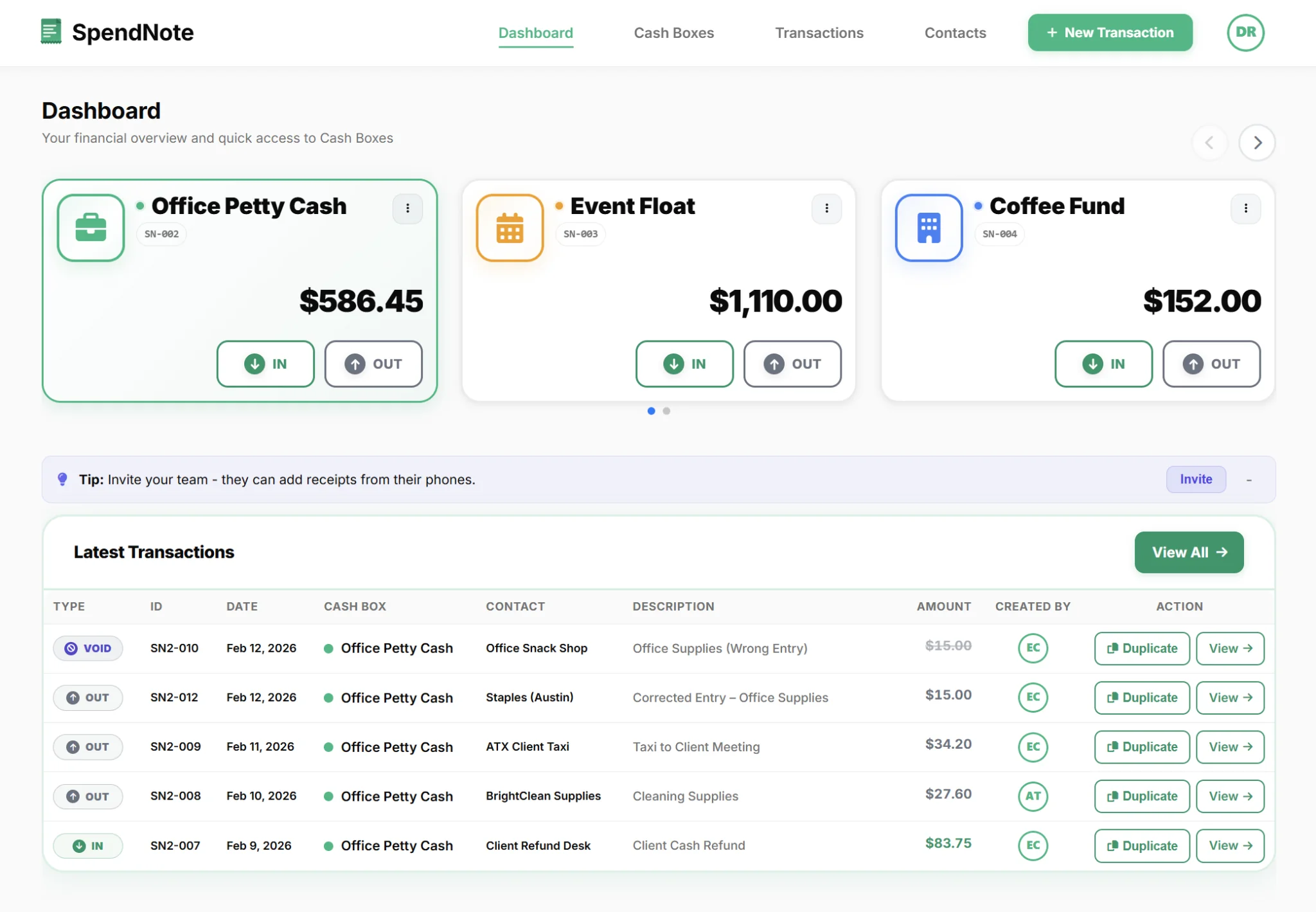
Petty cash software answers that question in real time. The custodian hands $200 to the supervisor for the day's float drops; the supervisor's name shows up against that $200 in the dashboard; the owner sees it from the road on their phone. When the supervisor reconciles at end of day, the dashboard zeroes back to the custodian, with a per-entry record of every transfer in between.
That's cash custody tracking: the chain of who holds the money, signed and timestamped at every handover, visible to whoever needs to see it. Sometimes teams call it who has the cash right now, sometimes cash handoff documentation. Same workflow, different name.
Why this matters when something goes wrong
"There's $40 missing" is a different conversation when the dashboard says "Sarah logged $40 out at 11:42, supervisor receipt SN3-018, signed handoff to Tom at 12:15, supervisor receipt SN3-019." That's an audit trail. The spreadsheet version of the same conversation is "I think Sarah took it? Maybe?" — and then a week of bad feelings.
Signed PDF Receipts for Every Transfer
This is the structural difference, and it deserves its own section. Every expense app on the market lets users upload a receipt — a photo of the vendor's till slip after a purchase. Useful, but it's the wrong half of the workflow for shared cash.
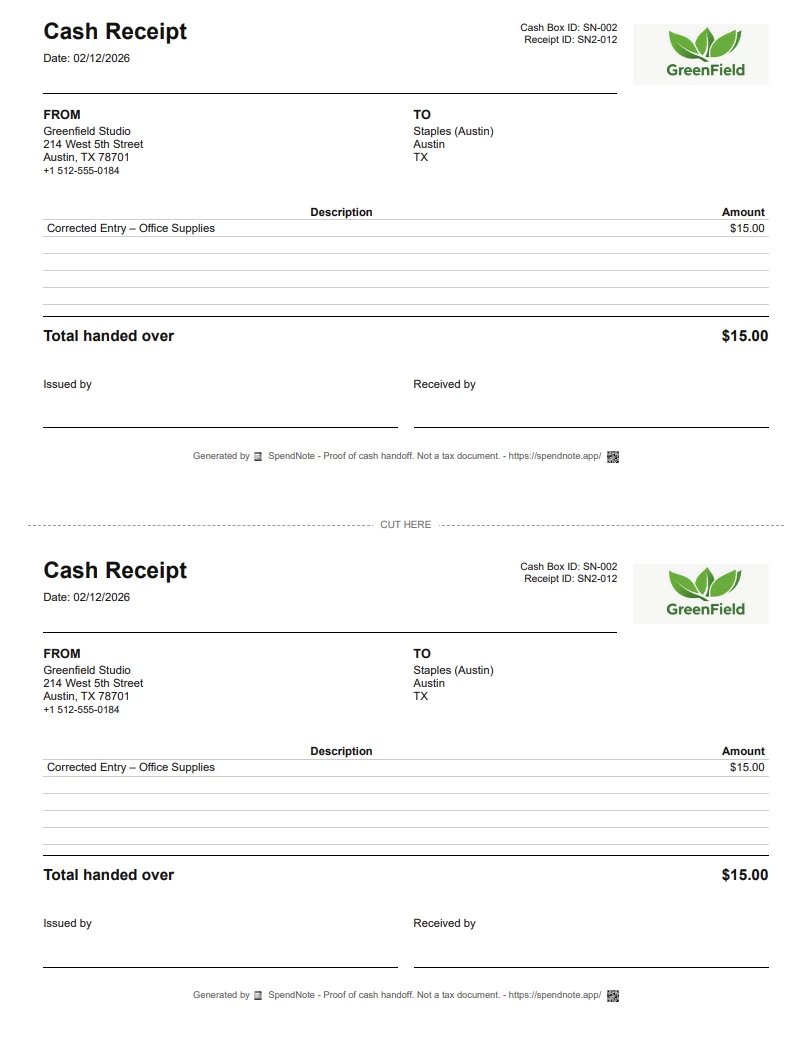
The receipt that actually matters in a cash-custody environment is the one your software generates when cash leaves your hand and goes to someone else on your team. SpendNote treats every transaction as a signed receipt event:
- Each transaction gets a unique ID (e.g. SN3-007).
- A printable, Letter-size PDF is generated automatically — two copies per page, one for each party.
- Pro plan adds email delivery: send the PDF directly from the transaction screen, with a public link the recipient can open without an account.
- Optional logo, branded layout, and field toggles (signature line, tracking details, addresses).
For the full receipt format, see our petty cash receipt generator. That same receipt logic is what powers every transaction inside this petty cash software — it's not a separate tool, it's the workflow.
Side-by-Side: Spreadsheet vs Expense App vs Accounting Software vs SpendNote
Same four categories as before, this time as a feature grid. Honest version — each tool wins something.
| Feature | Spreadsheet template | Expense app (cards) | Accounting software | SpendNote |
|---|---|---|---|---|
| Cost | ✓ Free | ~ Paid per user | ~ Paid per user | ~ From $15.83/mo |
| Live per-cash-box balance | ~ Formula-dependent | ✗ Card balance only | ✗ Books, not boxes | ✓ Live, multi-box |
| Signed PDF receipt per transfer | ✗ Not possible | ~ Vendor receipts only | ✗ Not the layer | ✓ Built in, every entry |
| "Who has the cash right now?" | ✗ Hidden in cells | ✗ Card-holder only | ✗ Not the workflow | ✓ Live dashboard |
| Multi-user, role-based access | ✗ Editor / Viewer only | ✓ Built in | ✓ Built in | ✓ Owner / Admin / User |
| Built around physical cash box | ~ Reusable template | ✗ Cards-first | ✗ GL-first | ✓ Cash box-first |
| Replaces accounting books | ✗ No | ✗ No | ✓ Yes | ✗ No (intentionally) |
| Clean export for your bookkeeper | ~ Manual | ✓ Built in | ✓ Native | ✓ CSV + branded PDF |
The pattern: spreadsheet wins on cost, accounting software wins on formal books, expense apps win on card workflows. SpendNote wins on the one specific thing the other three don't really try to do — tracking physical cash that moves between people, with a signed receipt at every step.
Track Your Team's Petty Cash in One Browser Tab
Set a starting balance, log your first transaction, generate a signed handoff receipt — in under 30 seconds.
Start Free TrialWhat Teams Actually Use It For
Petty cash software shows up in a handful of recognisable shapes. If any of these is your situation, the workflow above probably maps directly:
Multi-location small business
Two to four shops, a small franchise group, a multi-site clinic, food trucks. Each location has its own cash drawer; the owner wants every balance on one dashboard. See the online petty cash book for multi-site teams for the per-site flow.
School office and club treasurers
One main office plus separate floats for the PTA, athletics, the library fund, club treasurers. Each one needs its own balance and its own person responsible, with the office seeing across all of them.
Construction or field-site project managers
Cash for site supplies, parking, quick paid-cash purchases. Site supervisors record on their phone; you see the running balance for every site without driving out to collect a paper book.
Owners managing cash remotely
The custodian is on-site, the owner is on the road, the cash never moves through the owner's hands. You still need to see what's happening. The remote-management workflow covers exactly that.
When You Don't Need Petty Cash Software
Honestly: not every cash setup needs a paid tool. SpendNote is $15.83/month after a free 14-day trial, and it earns its keep when you have shared cash. If your situation is any of these, a notebook or a single spreadsheet tab is genuinely fine:
- You are the only person who ever touches the cash, and nobody else ever needs to know what happened.
- Volume is genuinely tiny — under 5 cash movements per month.
- Nobody ever asks you for a receipt for a cash handoff.
- There's no audit, no bookkeeper, no boss who wants visibility.
If you tick all four, save your $15. The moment any of them flips — a second person handles the cash, someone needs a receipt, you start losing track of who has what — that's when this category exists.
Important: SpendNote is petty cash tracking software for internal cash custody and handoff receipt generation. It is not accounting software, tax filing software, or bank reconciliation software. It does not replace QuickBooks, Xero, your accountant, or your tax preparer. It hands them clean monthly cash data instead of a shoebox of paper slips.
Getting Started in Under Five Minutes
Step 1: Create a free account — no credit card.
Step 2: Set your current cash-on-hand as the starting balance for your first cash box.
Step 3: Record the next real transaction on your phone the moment the cash moves — amount, who, what for, which cash box.
Step 4: Print or download the PDF handoff receipt. Hand a copy to whoever received the cash.
Step 5 (Pro): Invite your team. Each person sees only the cash boxes they're assigned to; every action is attributed.
That's the whole onboarding. Within a week you'll have a complete digital record of every cash movement and a printable handoff receipt for each one. For a slower walk-through of the underlying tool, see the longer SpendNote petty cash app overview.
Frequently Asked Questions
What's the difference between petty cash software and accounting software like QuickBooks or Xero?
Accounting software is the ledger — it records the formal journal entries, balance sheet, and tax-ready totals your bookkeeper needs. Petty cash software sits one layer below: it tracks the physical cash itself as it moves between people, generates a receipt for each handoff, and shows who has the cash right now. SpendNote does not replace QuickBooks or Xero — it gives them a clean monthly CSV/PDF of the cash that moved, so your bookkeeper isn't reconstructing a paper voucher book.
We already use Pleo / Ramp / Brex / Spendesk for expenses — do we need separate petty cash software?
Those tools are built around company cards and reimbursements — what employees pay for with plastic or get paid back for later. Petty cash is the opposite workflow: physical cash that moves between people on your team (custodian to supervisor, office float to site manager) where the proof is a signed receipt, not a card swipe. If you have a real cash drawer and people who actually carry cash around, an expense app won't track who has it or generate the handoff receipt. SpendNote handles exactly that, and is intentionally not trying to compete with Pleo on the card side.
Why generate receipts? Isn't capturing vendor receipts enough?
Vendor receipt capture is the wrong half of the workflow for shared cash. The receipt that actually matters is the one you generate when cash leaves your hand and goes to someone else on your team. The custodian hands $200 to the supervisor; the supervisor signs; both keep a PDF; the system records it. That's the proof that stops "I never got that money" disputes. SpendNote treats every transaction as a signed receipt event — that's the structural difference.
How is this different from a Google Sheets or Excel petty cash template?
A template is a static file — you do all the work (formulas, manual entries, version control, role rules you can't actually enforce). Petty cash software handles those automatically and adds things a spreadsheet structurally can't: a signed PDF receipt for every transfer, a per-row "who recorded this" log, real role separation between admins and regular users, and multi-cash-box dashboards instead of multi-tab juggling. If you've already outgrown your sheet, see our petty cash app vs Excel and petty cash app vs Google Sheets comparisons for the detail.
Can multiple people on my team use it at the same time?
Yes. SpendNote is built around team cash custody from day one. Each team member has their own login, role-based permissions, and every action is timestamped and attributed. The Pro plan includes 3 users and role-based access; the custodian records, the supervisor signs, the owner reviews from anywhere — all on the same live dashboard.
Does SpendNote replace my accountant?
No, and it intentionally doesn't try. SpendNote is operational software — it documents the cash that moves between people on your team and generates the receipts that go with each handoff. Your accountant and accounting software still handle the formal journal entries, tax filings, and reconciliation against the general ledger. SpendNote just hands them clean monthly data instead of a shoebox of paper slips.