A Simple, Cloud-Based Petty Cash App for Small Teams
Record every cash movement online — from any phone or laptop, anywhere. Generate a printable PDF receipt for each transaction. Watch the float update in real time across the team — and stop digging through spreadsheets at month-end.
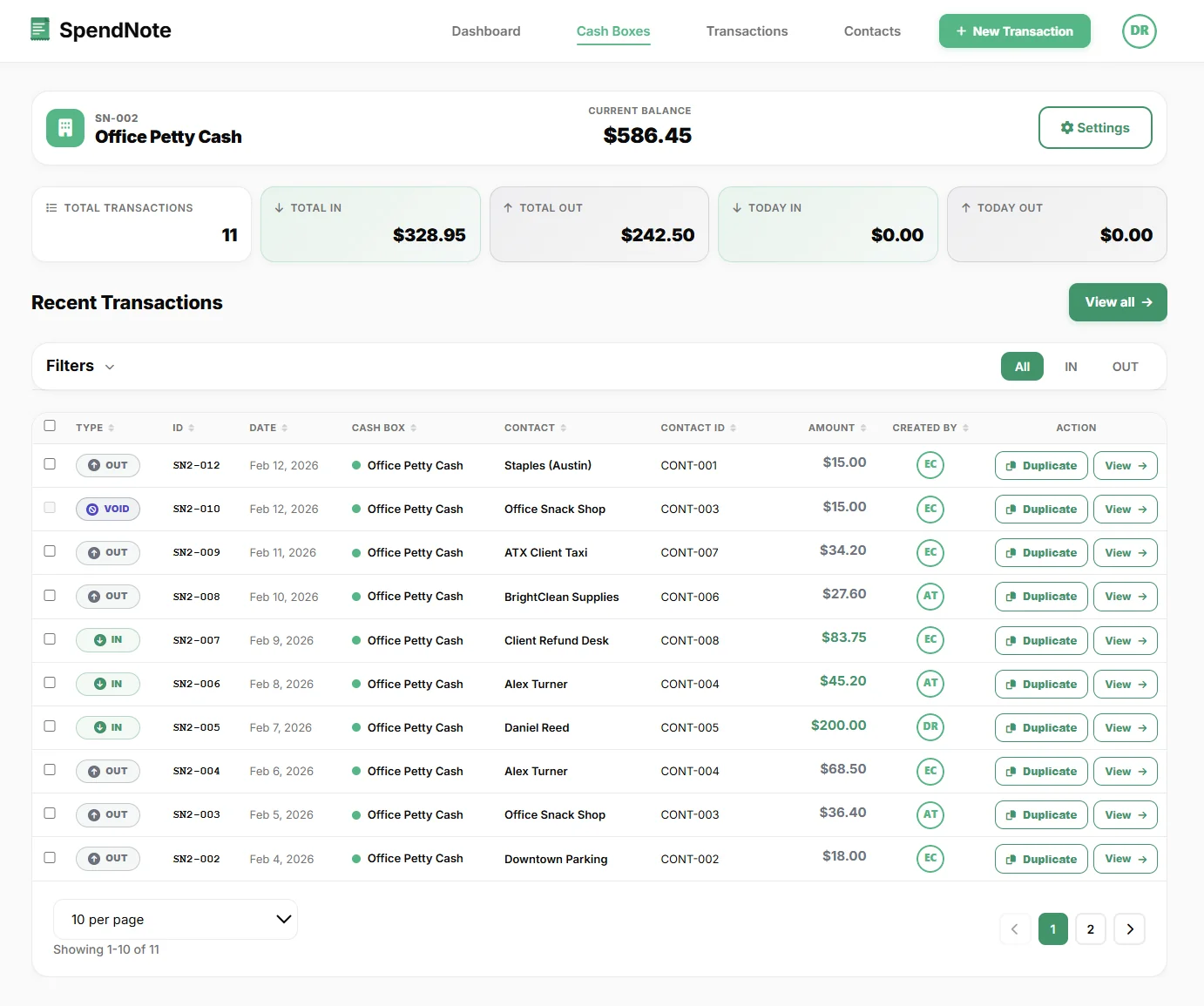
What You Can Do in 30 Seconds
Open SpendNote in your phone’s browser, and within half a minute you can:
- Record a cash transaction — amount, type (in or out), purpose, who took it or received it, which cash box.
- Generate a printable PDF receipt — every transaction gets a unique ID like SN3-007 and a Letter-size PDF you can print or download.
- See who handled the cash — every entry is timestamped and tied to the user who recorded it.
- Watch the running balance update — per cash box, no formulas, no spreadsheet math.
- Email the receipt directly — on Pro, send the PDF from the transaction screen with a public link for the recipient.
- Close the day — print a daily cash report with opening and closing balance and a cash count section to sign.
- Export at month-end — bulk CSV or PDF report, ready for your bookkeeper.
That is the whole loop. No setup, no installation, no learning curve. The custodian records on their phone, the owner watches the dashboard from theirs.
Why People Search for “An App for Petty Cash”
If you got here by typing app to record petty cash slips, petty cash management app, or I need a simple app for keeping track of petty cash — you are not alone. Most small operations start with a paper voucher book or an Excel template, and within a few weeks the cracks start showing.
What breaks first
- Handwritten slips pile up in an envelope — half are illegible by the end of the month.
- Two people touch the cash, but only one updates the spreadsheet.
- The float drops below the limit and nobody notices until the box is empty.
- At audit time you cannot answer the simplest question: who took the $40 on the 12th, and is there a receipt?
- The Excel file lives on one laptop. The cash lives in a different room. The owner is on the road.
A petty cash app fixes the loop by putting the record next to the cash — in the browser of whoever is actually handling it. Every transaction is logged the moment it happens, a numbered PDF receipt is generated for the handoff, and the running balance is visible to the owner from anywhere.
What a Real Petty Cash App Does
SpendNote is a cloud-based, browser-only petty cash app, built around the actual workflow of a petty cash custodian — not a generic accounting tool. Nothing to install: open it on any phone, tablet, or laptop, and the whole team sees the same live data, updated in real time. Here is what you can do from day one:
Record slips in the browser
Log every cash IN and cash OUT in seconds — amount, purpose, who took it, who received it. Works on phone, tablet, or desktop. No app to install.
Auto-generate a PDF receipt
Every transaction gets a unique ID and a printable, Letter-size PDF receipt for the cash handoff — ready in about 30 seconds.
Customizable receipt layout
On Standard and Pro: upload your logo, choose Quick or Detailed layout, toggle fields like addresses, tracking details, and signatures. See the custom logo example.
Track the float in real time
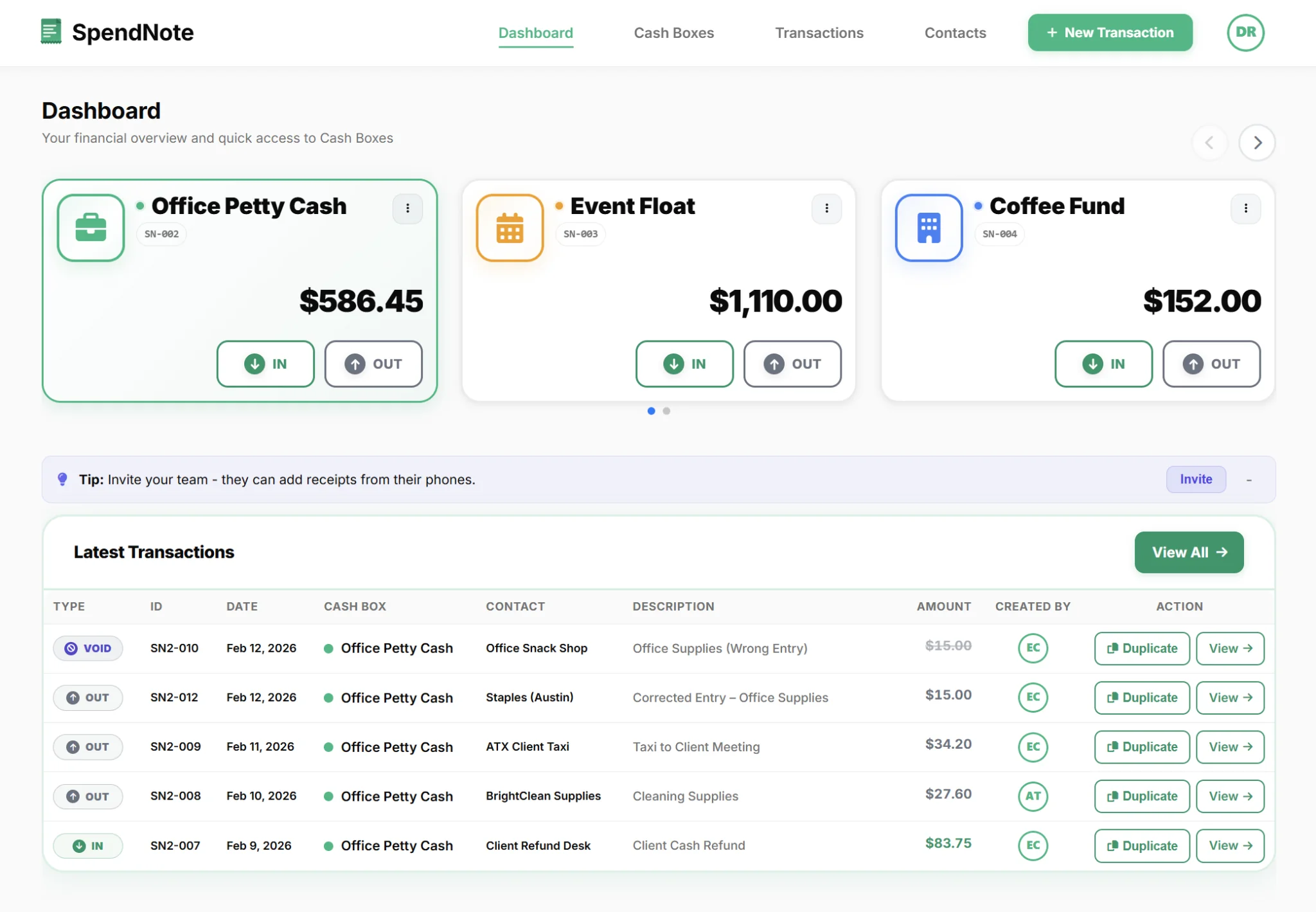
See the running balance for every cash box. Know exactly when it’s time to replenish.
Multi-cash-box tracking
Organize cash by location, event, or purpose. See every box at a glance from one dashboard.
Multi-user with role-based access
Pro plan: 3 users included, role-based permissions, every action timestamped to the user who recorded it.
Searchable transaction history
Find any past transaction by date, amount, or who handled it — in seconds. Audits stop being scary.
Bulk CSV & PDF export
Export filtered transactions as CSV or PDF for your bookkeeper. No more screenshots of spreadsheets.
Daily cash report
Pick a cash box and a day: opening balance, cash in, cash out and expected closing balance, plus a cash count section for over / short and signatures. Print or save as PDF.
Email receipts directly
Pro plan: send the PDF receipt from the transaction detail screen, with a public link the recipient can open without an account.
Cloud-based — access from anywhere
Online and web-based, with nothing to install. The custodian records on site, the owner watches the dashboard from home, the office, or the road — same live data, real-time team visibility.
From Slip to Receipt to Report — in One Place
The thing that makes a real petty cash app different from yet another spreadsheet is that the slip, the printable handoff receipt, the running balance, and the month-end export all live on the same record. You enter the amount once, in the browser, the moment the cash moves.
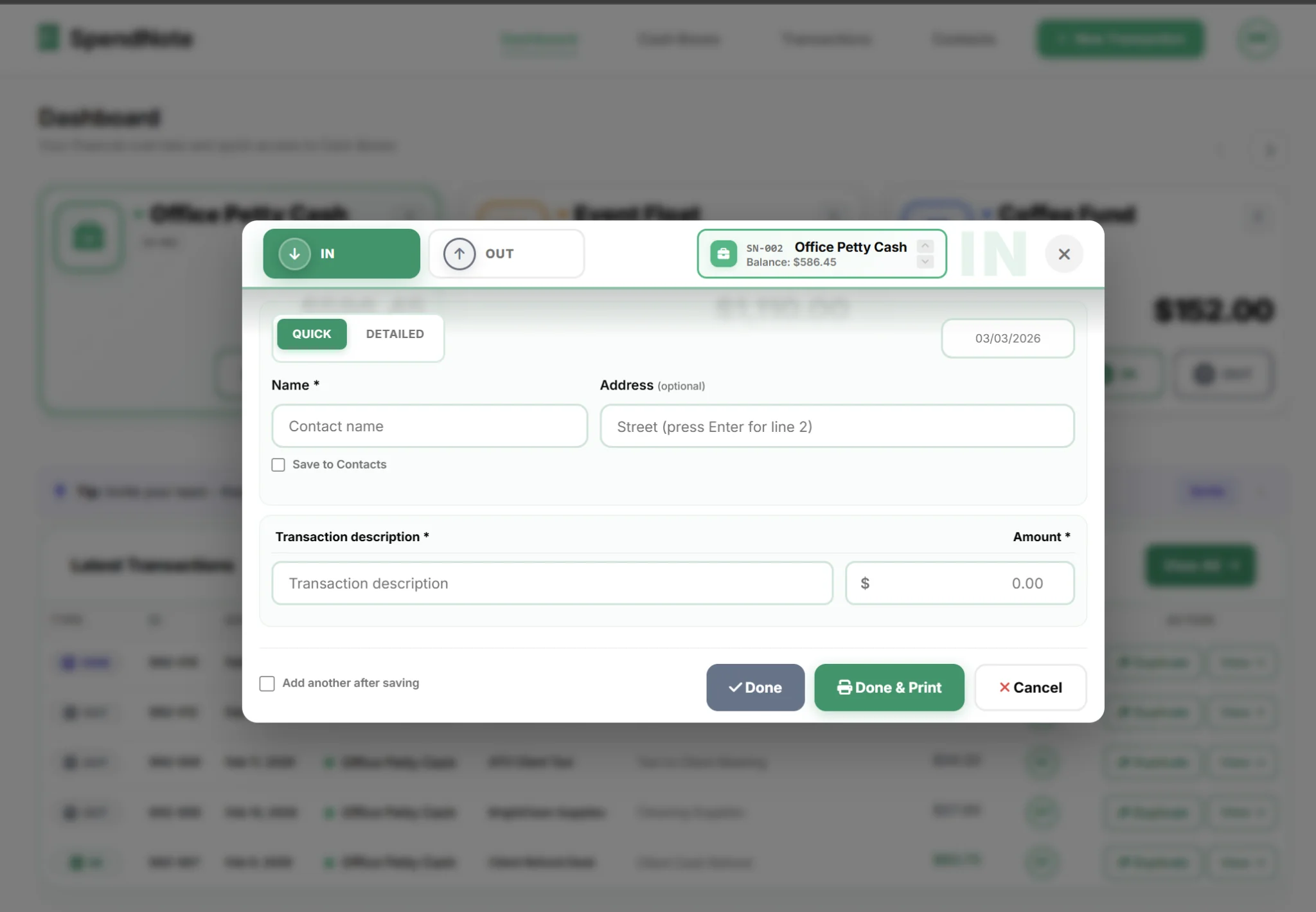
- Open SpendNote in your browser. Phone, tablet, or laptop — same login, same data. Tap New transaction.
- Enter the amount, type (in or out), and purpose. Pick the right cash box and who took or received the cash.
- Save. The running balance updates. A unique transaction ID is assigned (e.g. SN3-007).
- Generate the receipt. Print the Letter-size PDF (two copies per page), download it, or email it to the recipient (Pro).
- At month-end, bulk export. CSV or PDF report — hand it to the bookkeeper. Done.
Who Uses a Petty Cash App?
Anyone who handles physical cash and is responsible to someone else for where it went. In practice that means:
If you are a nonprofit specifically, start with the petty cash policy guide — rules, limits, and approvals you can adapt to your org — then plug them straight into the app.
Petty Cash App for Multi-Site Teams
One office, one cash box, one custodian — that’s the easy case. The honest pain shows up the moment you have two or more locations with their own cash drawer: the second shop, the third construction site, the school office plus its half-dozen club floats, the multi-clinic with petty cash in each waiting room. Suddenly there are three different paper books, three different Excel sheets, and three different versions of “wait, why doesn’t this match?” at month-end.
SpendNote handles this case directly. Create one cash box per site (or per project, or per department), each with its own running balance and its own assigned users. Site managers see only their own location; the owner sees every box on one dashboard, in real time. No emails of spreadsheets, no driving out to collect a paper ledger.
Multi-Location Small Business
Two to four shops, a small franchise group, a multi-site clinic, or a few food trucks. Each site has its own petty cash drawer for change, supplies, and quick reimbursements. SpendNote gives every site its own cash box and its own custodian, while the owner watches every balance from one screen — no more piecing together three Excel files at month-end.
School Office & Club Treasurers
One main school office plus separate cash floats for the PTA, athletics, the library fund, and a couple of student clubs. Each one needs its own balance and its own person responsible — but the office wants visibility across all of them. Per-cash-box role-based access plus one shared dashboard fits this exactly.
Construction & Field-Site Project Managers
Two or three active sites, each with a small cash box for site supplies, parking, and quick paid-cash purchases. Site supervisors record transactions on their phone the moment they happen; you see the running balance for every site without driving out to collect the paper book at the end of the week.
For the full multi-cash-box workflow side — per-site balances, role-based access, and one-export-many-sites — see the longer write-up on the online petty cash book page.
Stop tracking cash in a spreadsheet
Free 14-day trial, no credit card. Open it in your phone’s browser, record the next slip, and you’ll see the difference in five minutes.
Start FreePetty Cash App vs Paper, Excel, Generic Expense Apps, and POS
Most teams hit the petty cash wall in the same order: paper voucher book → Excel sheet → "let's just use our expense app" → "we need something for the cash box specifically." Here is the honest comparison:
| Tool | The problem with it for cash | What SpendNote does instead |
|---|---|---|
| Paper voucher book | Slips get illegible or lost. Only the custodian knows what is going on. Audits are a nightmare. | Every transaction logged with a unique ID, printable PDF receipt, full searchable history. |
| Excel template | Single laptop, single user. No printable receipts. Formulas break. The cash is in the next room. | Browser-based and team-wide. Custodian records on the spot, owner sees the float live, PDF receipts on demand. |
| Generic expense app (Ramp, Brex, Spendesk, Pleo) | Built for cards and reimbursements. Cash boxes are an afterthought. Pricey for a small team. | Built around the cash box itself: float tracking, multi-box, role-based access, replenishment workflow. |
| POS / register | Tracks sales, not internal petty cash spending. No internal handoff receipt. | Dedicated to internal cash — supplies, parking, tips, small purchases — with a printable handoff receipt for each one. |
| Accounting software (QuickBooks, Xero, Bench) | Full ledger system. Far too heavy for "who has the $40 right now?" | Operational layer in front of your books. Clean CSV/PDF export at month-end. |
Longer breakdowns by spreadsheet flavour: petty cash app vs Excel, and the same wall — slightly differently shaped — in petty cash app vs Google Sheets. If you are searching for terms like "the bench petty cash tracker" or "a digital petty cash app" — SpendNote is exactly that, focused on the cash side without trying to replace your accounting system. Some teams shop for this category as "app", others as petty cash software — same SpendNote, slightly different buyer language.
Getting Started in Under Five Minutes
- Create a free account — no credit card.
- Set the receipt display name (and optionally upload a logo) so the generated PDFs come out branded.
- Set up your first cash box with the starting float amount.
- Bookmark SpendNote in the phone’s browser (or use “Add to Home Screen”) so the custodian can open it with one tap.
- Record the next real transaction the moment it happens, then print or download the PDF receipt for the handoff.
- Invite your team (Pro plan) so the manager and the owner see activity in real time.
That’s the whole onboarding. Within a week you’ll have a complete digital record of every cash movement and a printable handoff receipt for each one — the kind of audit trail that used to take a full-time bookkeeper to maintain.
Important: SpendNote is for internal petty cash tracking and digital handoff-receipt generation. It is not an accounting system, tax filing tool, or bank reconciliation product. Your accounting software still handles the formal journal entries — SpendNote just gives it clean, complete cash data to work from.
Frequently Asked Questions
What is a petty cash app?
A petty cash app is a tool you use on your phone or browser to record every cash transaction in and out of a petty cash box. Instead of writing slips on paper or maintaining an Excel sheet, you log each entry in the app — amount, purpose, who took it, who received it — and the running balance updates automatically. SpendNote also generates a printable PDF receipt for every transaction, with a unique ID, so you have a documented record of the cash handoff.
Is there a free petty cash app?
SpendNote starts with a free 14-day trial with full access — every feature, unlimited cash boxes, and unlimited transactions, so you can test the complete workflow on a real petty cash float. No credit card required. After the trial, continue on Standard or Pro from $15.83/month.
Can I use it on my phone?
Yes — SpendNote runs in any modern browser on phone, tablet, or desktop, so the custodian can record a transaction the moment the cash leaves the box and the owner can watch the float from anywhere. There is nothing to install.
Does a petty cash app replace QuickBooks or accounting software?
No. A petty cash app handles the operational layer — who took cash, what it was for, what the float is right now, and the printable handoff receipt. Your accounting software still handles the formal journal entries and reconciliation against the GL. The petty cash app gives your bookkeeper a clean CSV or PDF export to work from at month-end.
Can multiple people use the same petty cash account?
Yes. The Pro plan includes role-based access so the custodian (the person who physically holds the cash), team members, and the owner each see what they need to. Every transaction is timestamped and tied to the user who recorded it.
What kind of receipt does the app produce?
Every transaction gets a unique ID (e.g. SN3-007) and a printable, Letter-size PDF receipt that documents the cash handoff. You can print it (two copies per page), download the PDF, or — on the Pro plan — email it directly from the transaction detail screen with a public PDF link for the recipient.
Can I customize the receipt layout?
Yes. On Standard and Pro you can upload your company logo, choose Quick or Detailed layout, and toggle which fields appear (addresses, tracking details, signatures). Pro adds full localization — customize every text label except the mandatory legal disclaimer.
Try everything. Pay nothing for 14 days.
Then, if you love it
- Unlimited receipts and cash boxes
- Your logo on every receipt
- Print, PDF & CSV export
- Daily cash report with cash count
Every cash handoff, recorded and signed.
Set up in two minutes. First receipt in thirty seconds. Every entry saved and searchable.
Start my free trial