When You Need a Cash Box Request Form
Anyone in PTA, PTO, athletics, school clubs, fundraisers, or community events knows the pattern: someone needs the cash box, you hand it over, and at the end of the day you’re trying to reconstruct from memory who had what and how much went missing.
A cash box request form turns that handoff into a written record — before the event, not after. It answers four questions every treasurer needs answered the next morning:
- Who took the box? Name + contact, not “the tall guy from Booth 4”.
- How much was in it when it left? Starting cash with a denomination count, not “about $200”.
- What was it for? The event, booth, shift, or purpose.
- When is it coming back? Expected return time, so a missing box doesn’t become a panic at midnight.
Without a request form, every cash box handoff is a verbal agreement — and at close-out, every variance is somebody’s word against the count.
The Cash Box Lifecycle: Request → Handoff → Track → Close Out → Return
Step 1: Request
The volunteer or staff member fills out the request: name, event, purpose, date, expected return. The treasurer or organizer reviews and approves the requested float amount.
Step 2: Handoff
At handoff, both parties count the cash together by denomination, sign the form, and the treasurer records the starting balance in the shared log. The volunteer leaves with the box and a paper or digital copy of the request.
Step 3: Track During the Event
Cash coming in (sales, donations to the booth) and cash going out (change made, supplies bought on the spot, paid-outs to vendors) are logged as they happen. Skip this and the close-out becomes a guessing game.
Step 4: Close Out
At the end of the event, count the closing cash by denomination. Compare against the expected balance (starting cash + cash in − cash out). Document the variance — even if it’s zero. If it’s not zero, you have the transaction list to scroll back through.
Step 5: Return
The volunteer returns the box and the close-out record. The treasurer counter-signs, the request is marked closed, and the cash goes back into the main float (or the deposit envelope, depending on the org’s policy).
What a Cash Box Request Form Should Include
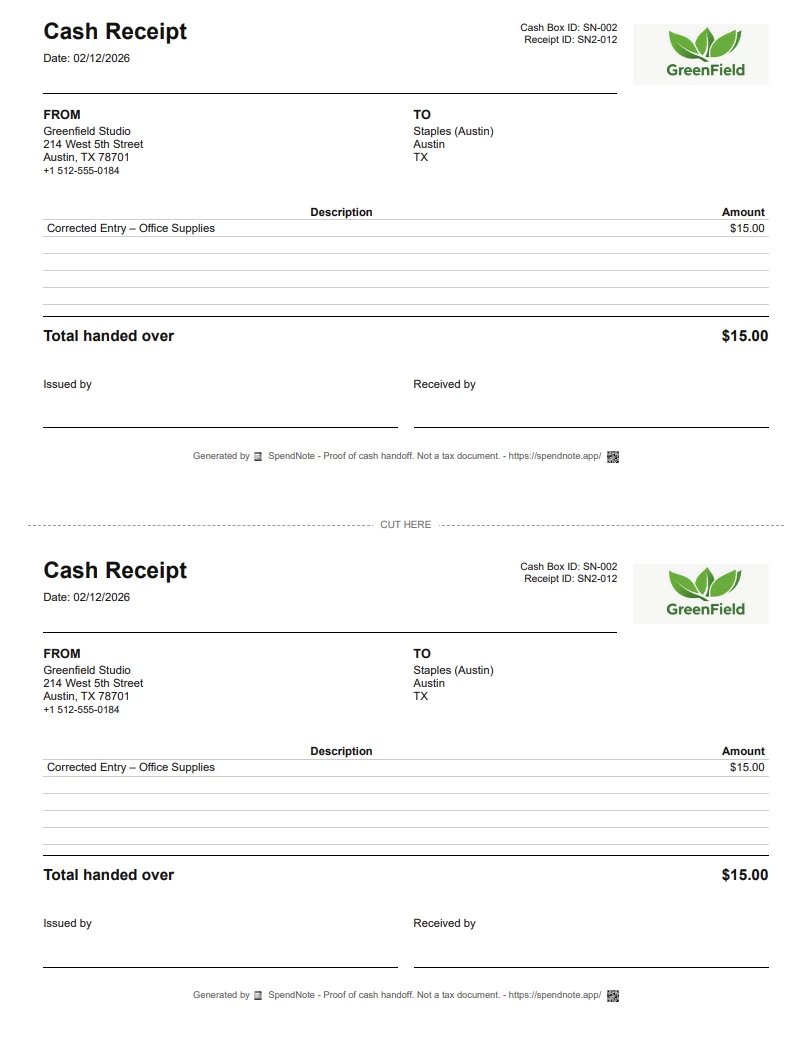
At minimum, a working cash box request form captures these fields. Whether it’s on paper or in a shared digital log, the data is the same:
- Requester name + contact — who’s taking the box
- Event or purpose — bake sale, game night, registration table, fundraiser, etc.
- Requested date and expected return date/time
- Starting cash amount — with a denomination breakdown ($1s, $5s, $10s, $20s, coins)
- Approver name and signature — treasurer, board officer, or designated organizer
- Requester signature — acknowledging receipt of the cash and the responsibility
- Close-out fields (filled in at return): closing cash count, cash in during event, cash out during event, expected vs actual variance, notes
PTA, PTO, School & Volunteer-Run Events
Volunteer-run organizations rotate cash handlers constantly — a different parent at every bake sale, every game night, every spirit-week table. A cash box request form is the only realistic way the treasurer can track what’s happening across 30+ events a year without becoming the bottleneck.
Common scenarios where a request form earns its keep:
- PTA / PTO bake sales and fundraisers — one cash box per booth, one volunteer per box, one request per handoff
- School game-night ticket tables — cash float for change, ticket sales tracked separately, close-out at the end of the night
- Sports concession stands — different parent volunteers across the season, each shift a fresh handoff
- Booster clubs — multiple events per month, multiple volunteer handlers, one shared log to keep it sane
- Festival booths and community fairs — multi-booth events where every booth needs its own float and close-out
For the operational side of running event cash, see also our event cash handling guide and the live cash holder view for tracking across volunteers in real time.
Stop Reconstructing the Day From Memory
Skip the paper form — every handoff signed, every transaction timestamped, every close-out receipted. Both sides keep a copy. Free to start, no credit card.
Create First Handoff ReceiptWhy a Paper Form Isn’t Enough at a Real Event
For a one-off small event, a paper form in a clipboard works. The problems start when:
- The event has multiple booths — the treasurer can’t be at every one to see live balances
- The event runs multiple days — mid-event handoffs between volunteers, and the paper form is in last night’s binder
- The org runs 20+ events a year — paper forms pile up, get lost, and never become a queryable history
- You need to answer “who had the cash on March 14?” six months later for the year-end review — flipping through a binder is not the answer
- Variances need to be investigated mid-event — the paper close-out only shows the variance after the fact, not while there’s still time to find the missing receipt
From Paper Form to Live Cash Box Log
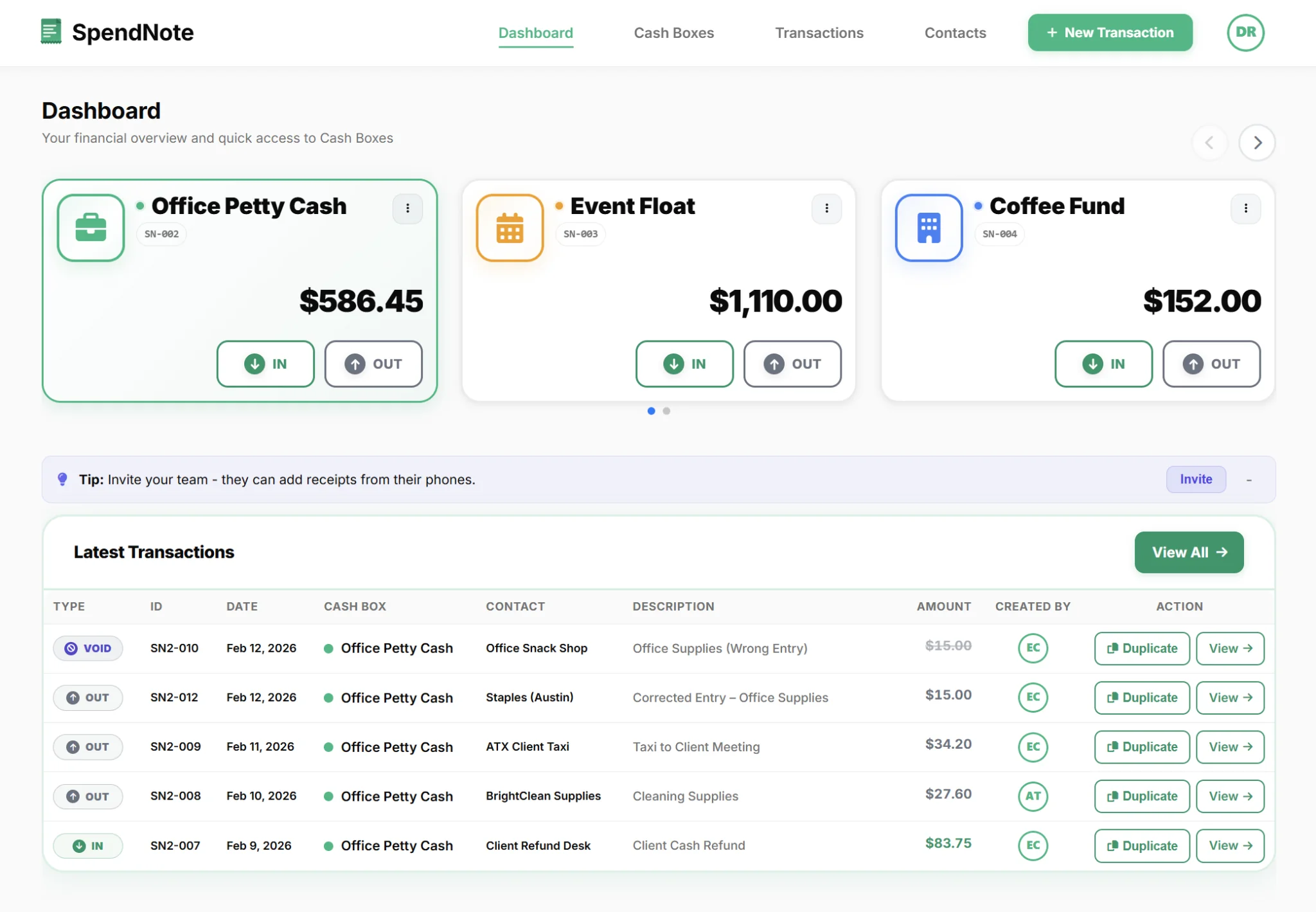
SpendNote replaces the binder of paper request forms with a shared digital cash box log:
- One cash box per event or volunteer — named, with a starting float and a live running balance
- Every cash movement (in, out, handoff) is logged in seconds with the user name and timestamp
- The treasurer sees every cash box from one dashboard — live, from any device, during the event
- At close-out, the full transaction list and PDF record is one export away — not a manual spreadsheet rebuild
- Searchable history: filter by event, volunteer, date, or cash box to answer any question later
For the policy framework around who can request a box and what the rules are, see our petty cash policy guide. To track who’s holding which cash box right now, see live cash holder visibility.
Important: SpendNote tracks the operational cash box workflow — who held the box, what came in, what went out. SpendNote is not a donor receipt system, not a charitable contribution tracker, and not a tax document. For 501(c)(3) donor receipts (US IRS $250 rule), Form 990 reporting, UK Gift Aid claims, or any tax-deductible donation acknowledgment, your treasurer, accountant, or dedicated nonprofit accounting tool handles those.
Frequently Asked Questions
What is a cash box request form?
A cash box request form is the document a volunteer, staff member, or club officer fills out when they need to take physical custody of a cash box for an event, fundraiser, or shift. It records who is taking the box, the starting cash amount, the date and event, and the expected return time. It exists so the organizer always knows where the cash is and how much was in it when it left.
Why do PTAs, PTOs, and schools use cash box request forms?
Volunteer-run organizations rotate the people handling cash constantly — a different parent at every bake sale, every game night, every fundraiser. A cash box request form creates a clear handoff between the treasurer and the volunteer, and a clear close-out at the end. Without it, every event ends with the treasurer trying to reconstruct what happened from memory.
What should a cash box request form include?
At minimum: requester name and contact, event or purpose, requested date and return date, starting cash amount with a denomination breakdown, signature of the requester, and signature of the approver. At close-out, the form should also capture the closing cash count, total income or sales, any expenses paid out from the box, and the variance between expected and actual.
Is a paper cash box request form enough?
At a small one-off event, yes. At a multi-booth event, a multi-day fundraiser, or a year-round volunteer organization with 20+ events, the paper forms get lost, sit in a binder no one reads, and don’t help mid-event when the treasurer is wondering where Booth 3’s cash float went. A shared digital cash log keeps every request, handoff, and close-out in one searchable place.
Does SpendNote handle PTA or PTO donor receipts?
No. SpendNote tracks the operational cash box workflow — who held the box, what came in, what went out. For 501(c)(3) donor receipts (US IRS $250 rule), UK Gift Aid claims, Form 990 reporting, or any tax-deductible donation acknowledgment, your treasurer, accountant, or dedicated nonprofit accounting tool handles that. SpendNote is the operational cash log layer underneath, not the tax document layer.